
On this page
- Simulator Credit Caps for Each Certificate
- What the ceilings actually allow
- Read the syllabus, not just the total
- Which Simulator Devices Qualify for Credit
- Check the authorization before the cockpit
- How to Log a Simulator Session Step by Step
- Complete the entry with your instructor
- Keep aircraft classifications out of the entry
- Simulator Entries That Get Hours Rejected
- Separate a clerical fix from unsupported training
- Building a Proof Packet for Future Applications
- Save the entry and its supporting evidence
- Reconcile while corrections are practical
- Simulator Hours Toward CFII and Airline Goals
- Test a device block against each goal
- Splitting Hours Between Simulator and Aircraft
- Build a training block around tasks
- Debrief performance before buying another block
- Confirm Your Simulator Plan Before You Book
- Choose the next step for your experience level
The popular advice that simulator time counts leaves out the part that matters: counts toward what? You can record legitimate training in a device without being allowed to apply all of it toward a particular certificate, rating, or employment minimum. For a new career pilot, treating those questions as interchangeable can produce an impressive-looking logbook with totals that don't support the next application.
Logging simulator time correctly starts before the lesson. You need to know the device, the applicable training rule, who will instruct the session, and where the time belongs in your records. The objective isn't to accumulate the largest simulator total. It's to build useful skills and preserve credit you can substantiate.
Simulator Credit Caps for Each Certificate
For eligible full-flight simulator and flight training device training, the principal ceilings are below. These are limits on regulatory credit, not permission to relabel device training as aircraft flight time.
Simulator credit caps by rule, device and course type
| Rule | Applies to | Credit limit | Source |
|---|---|---|---|
| Private pilot, FFS or FTD with an authorized instructor outside the Part 142 exception | Private-pilot aeronautical experience | 2.5 hours maximum | 14 CFR § 61.109 |
| Private pilot, appropriate FFS or FTD through a course at an FAA-certificated Part 142 center | Private-pilot aeronautical experience | 5 hours maximum | Same private-pilot regulation |
| Airplane commercial, appropriate FFS or FTD with an authorized instructor | Credit toward total aeronautical experience | 50 hours maximum | 14 CFR § 61.129(i) |
| Instrument rating, FFS or FTD outside Part 142 | Instrument training received from an authorized instructor | 20 hours maximum | FAA instrument certification guidance |
| Instrument rating, FFS or FTD within an approved Part 142 course | Instrument training received from an authorized instructor | 30 hours maximum | Same FAA instrument certification guidance |
What the ceilings actually allow
For private-pilot training, the device must appropriately represent the aircraft category and class, and type where applicable. The training-center exception attaches to the qualifying course, not merely to a school having a simulator available.
For airplane commercial training, equipment suitability matters just as much as the numerical allowance. The device must represent the airplane class and, where applicable, type appropriate to the rating sought. A generic desktop setup doesn't become commercial aeronautical experience because someone enters its duration in a spreadsheet.
Instrument credit also requires the correct combination of device, instruction, and course authorization. Don't apply an FFS or FTD allowance automatically to an aviation training device, even if both are advertised as simulators.
Practical rule: A credit ceiling tells you how much eligible training you may apply. It doesn't establish that the training you've purchased is eligible.
Read the syllabus, not just the total
A cap isn't a training target. Your instructor should select lessons because they address a skill or requirement, rather than scheduling enough device time to fill every available allowance.
Use a flight-training requirements checklist to separate aircraft experience, instructor-led training, and permitted device credit. Then test any program brochure with a direct question: Which rule does each block of simulator hours satisfy? A combined training total without that breakdown isn't enough to evaluate certificate eligibility.
Which Simulator Devices Qualify for Credit
An FFS, an FTD, and an ATD aren't interchangeable labels. Their qualification or approval basis determines what you can do with the training, not the size of the screen or how realistic the cockpit looks.
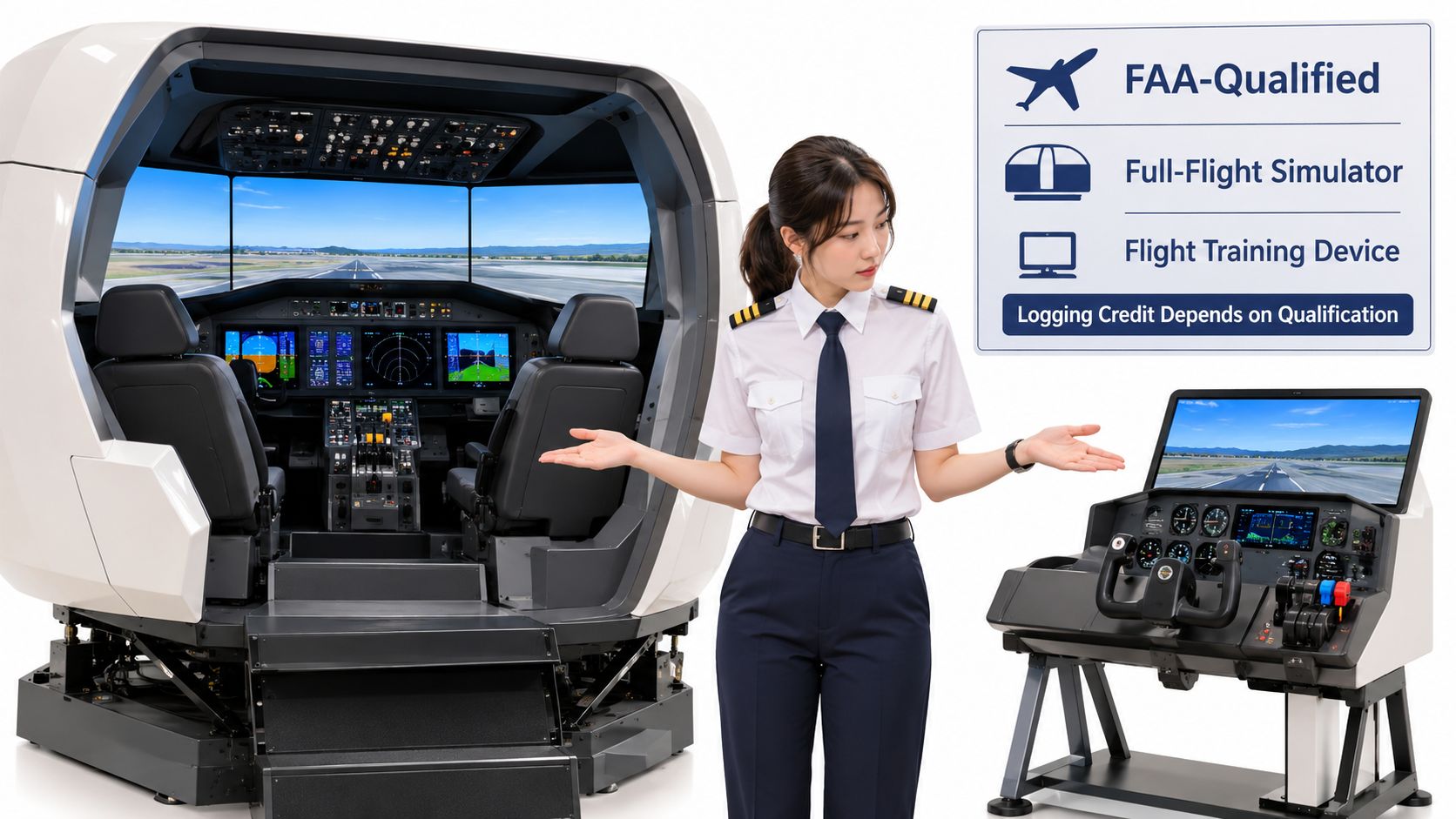
Simulator device types and their logbook treatment
| Device | What it represents | Qualification | Logbook treatment |
|---|---|---|---|
| Full-flight simulator (FFS) | Full aircraft cockpit and systems | FAA qualification under Part 60 and applicable approval | Device time with type and identifier |
| Flight training device (FTD) | Aircraft systems and cockpit for a class or type | FAA qualification under Part 60 and applicable approval | Device time with type and identifier |
| Advanced aviation training device (AATD) | Instrument and procedures training | Verify FAA approval and its permitted uses | Device time; simulated-instrument logging when eligible |
| Basic aviation training device (BATD) | Basic instrument flying | Verify FAA approval and its permitted uses | Device time; simulated-instrument logging when eligible |
| Personal computer aviation training device (PCATD) | Computer-based procedures training | Treat eligibility as unconfirmed until approval and applicable guidance are checked | Confirm credit eligibility before logging |
The FAA's Advisory Circular 61-98E information explains that FFSs and FTDs must be qualified and approved under § 61.4 before use for logging airman experience or obtaining training, checking, or qualification credit. For simulated-instrument operations in an eligible ATD, the visual component must be configured for instrument meteorological conditions while you control the device solely by reference to instruments.
Check the authorization before the cockpit
Request the exact device category, model, identifier, and qualification or approval documentation. Then match the intended lesson to the permitted use, rather than accepting a general statement that the equipment is FAA-approved.
A home desktop setup can still help you rehearse checklist order, navigation setup, and cockpit flows. Treat that as practice unless its specific approval and the governing rule establish otherwise.
The practical distinction in FAA-approved flight simulators is therefore not just realism. Confirm the device and course together before the first lesson, because similar-looking sessions can have different credit eligibility.
How to Log a Simulator Session Step by Step
Build the entry while the lesson details are fresh. Under 14 CFR § 61.51(b) and (h), the relevant record includes the date, total lesson time, lesson location, device type and identification, and the required instructor documentation for training received.
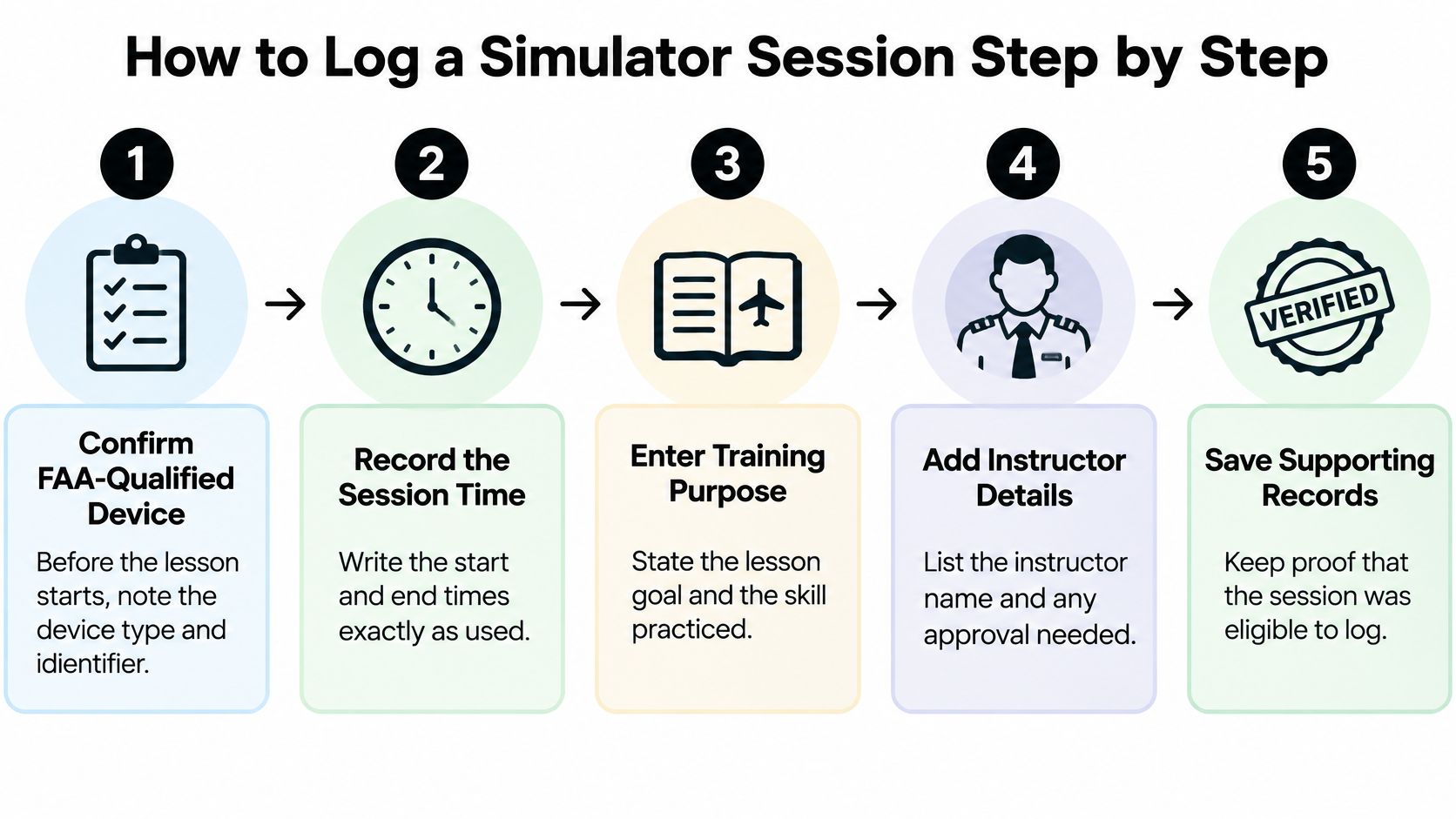
Complete the entry with your instructor
Confirm eligibility before starting. Verify the device's qualification or approval and note its type and identifier. This prevents you from discovering after training that the equipment wasn't eligible for the intended credit.
Enter the date and physical lesson location. Use the place where you operated the simulator, not merely the airport depicted in the scenario. A simulated approach destination doesn't identify where the lesson occurred.
Copy the device identity exactly. Match the type and identifier to the equipment documentation or school record. Don't substitute the registration of an airplane the device represents.
Record the instructed lesson duration. Don't copy the reservation length automatically. Have your instructor distinguish device training from separately conducted briefing or ground instruction so the entries describe what happened.
Describe the work performed. Identify procedures, approaches, holds, intercepts, avionics tasks, or abnormal situations, together with the conditions simulated. Record instrument time according to the qualifying instrument portion, not automatically the entire lesson.
Use the training-device fields. Enter instructor-provided training in the appropriate training-received field and identify it as device training. Leave aircraft flight-time columns blank rather than allowing software defaults to populate aircraft categories.
Obtain the complete instructor endorsement. Include the training description, lesson length, instructor signature, certificate number, and certificate expiration date or recent-experience end date, as applicable. A typed instructor name alone isn't a substitute for the required endorsement.
Reconcile before leaving. Compare duration, device identity, tasks, and endorsement against the school's training record. Correct a mismatch while the instructor and supporting records are readily available.
Keep aircraft classifications out of the entry
The major avoidable error is entering device training as aircraft flight time. Being the person operating the controls doesn't change what equipment you used or establish aircraft pilot-in-command time. Learn the separate conditions for logging pilot-in-command time before selecting that field.
Use this fill-in model, replacing every bracketed item with the actual lesson information:
Entry model: [Date], [physical location], [device category, model, identifier], [actual lesson duration] device training and training received, [qualifying simulated-instrument duration], [tasks and simulated conditions]; instructor [training description, lesson length, signature, certificate number, applicable expiration or recent-experience end date].
Simulator Entries That Get Hours Rejected
A running total can exceed the allowance for a particular certificate or rating even when each session was logged correctly. Stop counting simulator time toward that requirement once it reaches its applicable cap. The time may still belong in your training record, but it cannot add credit beyond the limit.
Recordkeeping obligations follow the FAA logbook rule in § 61.51. An incomplete entry may need correction or supporting documentation before it can substantiate the credit claimed.
Simulator entry errors, the rule at risk and the fix
| Error | Rule at risk | Fix |
|---|---|---|
| Simulator minutes entered in aircraft flight-time columns | § 61.51 logbook rules | Move the time to the device column and leave aircraft fields blank |
| Unobserved practice logged as training received | § 61.51(h), instructor-endorsed training | Keep unsupervised practice out of training-received columns |
| Endorsement missing signature, certificate number, or applicable expiration/recent-experience information | § 61.51(h) | Have the instructor complete the endorsement |
| Device type or identifier left blank | § 61.51(b) | Copy the identity from the school's device or training record |
| Lesson time copied from the booking | § 61.51(b), total lesson time | Enter the supported actual lesson duration |
| Running credit total exceeds the applicable allowance | Private, commercial, or instrument credit provisions | Stop applying additional time to that requirement at its ceiling |
Separate a clerical fix from unsupported training
A missing device identifier can often be resolved from the device record. An incomplete endorsement for an earlier lesson needs the instructor to verify the training before completing it.
If instruction took place but was omitted from the entry, the instructor and school records must support the correction. Unobserved practice cannot be reclassified as instructor-provided training through a later signature.
Ask the instructor to verify what happened, not to certify what should have happened.
Keep unresolved entries out of application totals until their support is clear. For digital records, retain the original entry and its audit trail. For paper records, make a legible correction without concealing the history.
Building a Proof Packet for Future Applications
A logbook entry may record a simulator session without showing why the device qualified for the credit claimed. Keep the supporting records together so a reviewer can check the device, instruction, and course context for an advanced certificate, ATP eligibility, or an employer's application.
The FAA's AC 61-98E discusses qualified and approved devices and instructor documentation. Preserve the records that connect your session to the applicable credit.
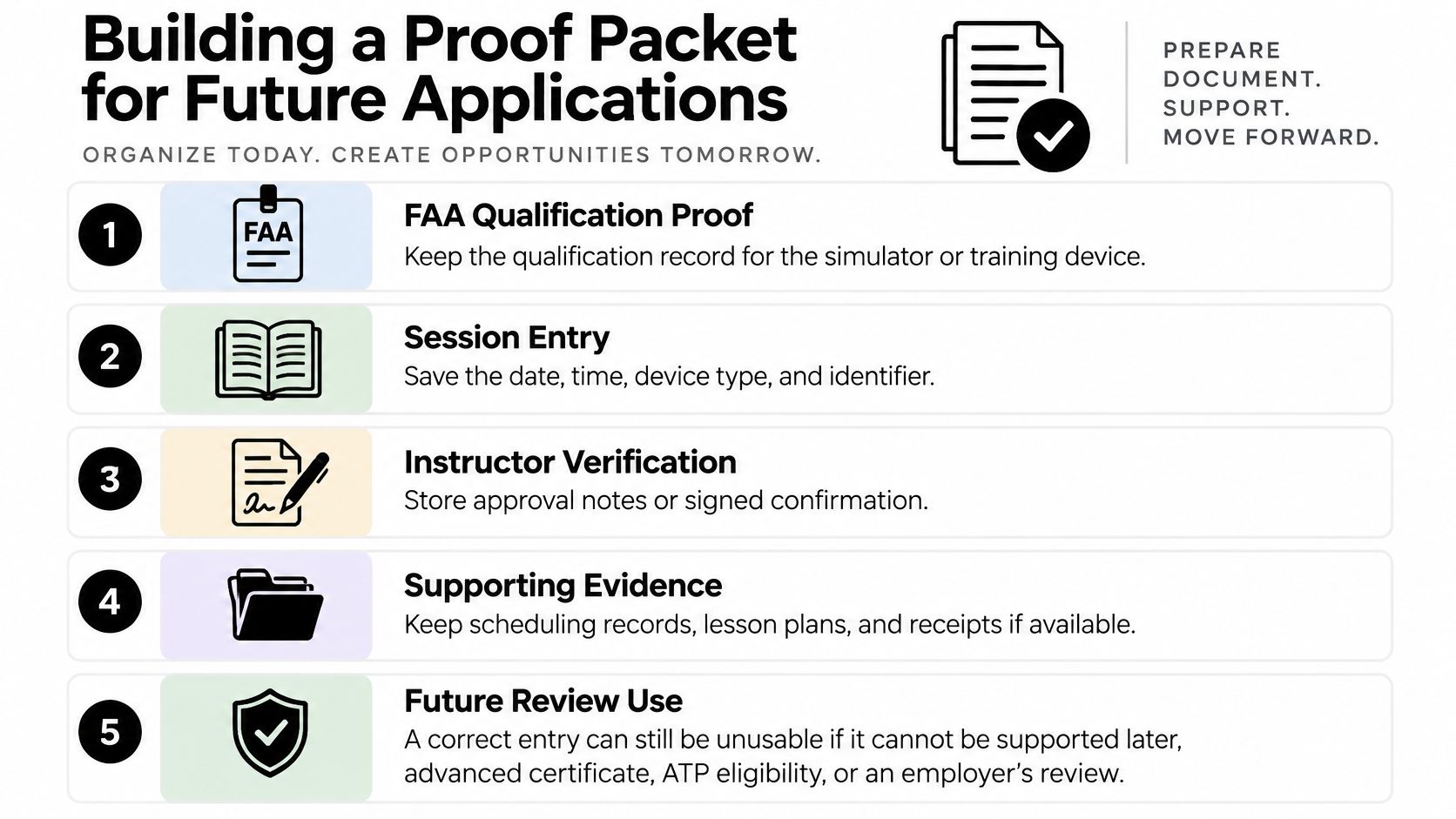
Save the entry and its supporting evidence
- Session record: Keep the logbook page or digital export, including the device identity, duration, and lesson description.
- Instructor verification: Retain the signed record and legible instructor certificate information.
- Training purpose: Save the lesson objective, tasks completed, and syllabus connection.
- Device eligibility: Keep the qualification or approval reference that applies to the equipment and training use.
- School record: Retain the corresponding lesson record and documentation identifying the approved course, if applicable.
Use a consistent file name based on the session date and device identifier. Store a separate backup so a lost account or damaged notebook does not erase your only copy.
Reconcile while corrections are practical
A proof packet can be complete on the surface yet lack the device qualification reference. For example, a student's logbook and lesson record may describe an instrument session, while the packet does not identify the device approval supporting the credit claim. Add the relevant device record before relying on that entry in an application.
Reconcile the packet with the school record during your regular logbook review, and save a dated copy. For flight instructor requirements, retain the underlying training and device records so an examiner can assess the basis for each claimed credit.
Simulator Hours Toward CFII and Airline Goals
Instrument-rating credit, CFII eligibility, and airline experience are separate targets. A simulator session that helps with one doesn't automatically satisfy the others.
Start by identifying the correct rule. Section 61.65 addresses instrument-rating requirements; it isn't the flight-instructor certificate rule. For CFII planning, review the applicable flight-instructor eligibility and training requirements with your instructor rather than treating an instrument-rating simulator allowance as a separate CFII entitlement.
For ATP planning, evaluate the applicable aeronautical-experience provisions of § 61.159. An employer may also ask for experience totals defined differently from a school's combined training total, so follow the application's definitions instead of copying a headline number.
Test a device block against each goal
Consider a student who finishes a qualifying FFS or FTD instrument block outside an approved training-center course and reaches that pathway's credit ceiling. The student can retain the full record of training received, but must evaluate any proposed commercial, instructor, or ATP use separately.
That block doesn't increase aircraft flight time. Nor should the student assume it fulfills a future employer's requested aircraft experience because it supported an earlier rating.
| Goal | What to establish for each entry |
|---|---|
| Instrument rating | Eligible device, authorized instruction, applicable course, remaining credit |
| CFII | Specific applicable instructor requirement and evidence the lesson satisfies it |
| Commercial certificate | Eligible device and training under the commercial provision |
| ATP or airline application | Specific regulatory permission and the application's requested experience definition |
Career-planning check: Keep training completed, regulatory credit applied, and aircraft experience as separate totals.
Build a tracker with a column for each goal, plus a short explanation of why an entry qualifies. Don't force a single combined total to do every job.
For aircraft experience planning, multi-engine time building requires its own attention to the experience sought. A simulated multi-engine cockpit exercise may teach useful procedures without supplying the aircraft experience a later requirement calls for. A school's advertised simulator total cannot establish how much applies to any particular career milestone.
Splitting Hours Between Simulator and Aircraft
A 30-hour instrument-training block could include 20 hours in an eligible FFS or FTD and 10 hours in an aircraft. Treat that as a planning example, not a complete instrument-rating schedule: the applicable credit limit, course requirements, required aircraft tasks, and demonstrated proficiency all shape the final split.
An approved training-center course may allow more eligible device time. That does not make aircraft practice optional. Use the airplane to check that simulated procedures hold up alongside aircraft control, visual transitions, communication, and operational decisions.
Build a training block around tasks
Assign simulator sessions to skills that benefit from focused repetition and controlled scenarios:
- Procedures: Rehearse departures, arrivals, holds, intercepts, approaches, and missed approaches.
- Workload: Make avionics changes while maintaining the instrument scan and following clearances.
- Abnormal situations: Practice recognizing a defined failure cue and responding to it.
- Aircraft transfer: Fly the same procedures while managing aircraft handling, visual integration, and operating conditions.
Debrief performance before buying another block
After each block, compare the planned tasks with what you completed. Confirm the instructor-verified duration and device category, then check the applicable credit remaining against the table above. Decide whether the next lesson should repeat a task, add difficulty, or validate the skill in an aircraft.
If you can program an approach only while the device is paused, focus the next session on maintaining control and situational awareness during setup. More repetitions of the same paused exercise will not address that weakness.
Use simulator time beyond an applicable credit limit for a specific practice goal, such as correcting a scan or improving workload management. Its value depends on whether it builds a skill you can demonstrate, not on whether it increases a total.
Confirm Your Simulator Plan Before You Book
Before paying for simulator training, confirm how the planned sessions fit your course and intended credit. Ask the school:
- Device eligibility: What category, model, and identifier will you use, and what qualification or approval supports the training?
- Applicable credit: Which rule permits each planned block, and what ceiling applies to the course?
- Instructor involvement: Who will observe and endorse the training, and what details will the endorsement include?
- Logbook treatment: Where will you record device time, training received, and qualifying instrument time?
- Supporting records: Can you obtain a school record for each session?
Choose the next step for your experience level
If you have not flown yet, a discovery flight can help you decide whether an accelerated schedule fits your goals.
CFII's Career Track costs $89,000, takes about nine months from zero experience to CFII and multi-engine, and includes six certificates and ratings. Training takes place in Southern California, including Riverside, Long Beach, and Corona. The program includes 282 hours: 204 single-engine, 25 multi-engine, and 53 simulator hours, plus all one-on-one instruction.
Program totals do not guarantee that every hour meets a later requirement. Before signing, compare the proposed simulator allocation with the applicable credit caps and confirm the device, course, and recordkeeping details.
CFII includes simulator training alongside aircraft training in its structured zero-to-CFII and multi-engine pathway. Visit CFII to discuss your starting point and how the planned device lessons, aircraft experience, and logbook records align with your certificate and career goals.
Planning to fly for a living?
See what the path from zero to a pilot career looks like, what it costs and how long it takes.
Learn to fly in Riverside
We train at Riverside Municipal Airport in modern airplanes with a parachute built in. Start with a one hour discovery flight, no experience needed.