
On this page
- Is a Digital Pilot Logbook Accepted by the FAA
- What a digital logbook is
- Who needs to think about this now
- What Every Entry Must Contain Under 14 CFR 61.51
- Why each field earns its place
- Gaps that create trouble
- Digital Versus Paper Logbooks Side by Side
- What digital does well
- Where paper still wins
- Core Features to Check Before You Subscribe
- Electronic Controls and Audit-Ready Records
- Controls that make an entry defensible
- Questions a reviewer may ask
- How to Set Up Your Digital Logbook Step by Step
- Start Your Training Records on a Verified Path
- If you haven't flown yet
- If you want the full career path
Yes, FAA guidance accepts electronic recordkeeping when your digital pilot logbook captures the entries required by 14 CFR 61.51 and keeps them accurate, accessible and traceable under the electronic recordkeeping advisory circulars. If an app totals your hours neatly, could you still prove years later who taught a lesson, in which aircraft, and whether an entry was changed after your instructor signed it? That's the better question. Convenience is easy to judge on day one. Evidentiary integrity and portability decide whether your record helps you at a checkride, a job interview or an audit years from now.
Is a Digital Pilot Logbook Accepted by the FAA
Under 14 CFR 61.51, pilots must keep records of flight experience and training. The rule does not require those records to be on paper, so a digital logbook can serve as your record when it preserves the required information and can be produced when needed.
A digital record works like a bank statement: its format may be electronic or printed, but its value depends on whether each transaction can be supported and retrieved later. For a logbook, that means being able to show who gave the instruction, which aircraft was used, and whether an entry or endorsement can be traced to its source.
What a digital logbook is
A digital pilot logbook is an app or electronic system that stores flight and lesson entries, totals hours by category, retains instructor endorsements, and exports records for review. It performs the recordkeeping tasks of a paper logbook while keeping the entries in an electronic format.
FAA advisory circulars AC 120-78, AC 120-78A and AC 120-78B describe acceptable approaches to electronic recordkeeping. These circulars provide guidance on meeting requirements; the regulations themselves set the rules.
Judge a logbook by the proof it preserves and whether you can take that proof with you.
Who needs to think about this now
Start considering recordkeeping with your first instructional flight. Those early entries become part of the record used to show experience and training later. If information is missing, it can be difficult to reconstruct after instructors move on, memories fade, or aircraft records no longer match what you recall.
Before choosing a system, ask whether you can retrieve and present its records years later, including entries, signatures, and any changes. That test puts evidentiary integrity and portability ahead of convenience.
What Every Entry Must Contain Under 14 CFR 61.51
An examiner doesn't check your logbook to admire the layout. They check whether each entry proves experience, training and currency without needing you to explain missing pieces.
Under 14 CFR §61.51 as summarized in FAA advisory circular guidance, training records include the date, total or lesson flight time, departure and arrival locations, aircraft or simulator identification, pilot-in-command or training details, and the kind of pilot experience or training received. The rule focuses on content and reliability, so a digital field must capture the same detail a paper page would. FAA guidance also recognizes electronic recordkeeping when systems maintain accurate, accessible, and traceable records.
| Entry field | What it records | Digital system check |
|---|---|---|
| Date | Date of each flight or lesson | Required field, rejects blank entries |
| Total or lesson time | Duration of the flight or lesson | Totals recalculate automatically from entries |
| Departure and arrival points | Where the flight started and ended | Required field, stored as a location |
| Aircraft or simulator identification | Make, model and registration or device ID | Selected from saved aircraft and device profiles |
| Pilot-in-command or training details | Role held and instructor responsible | Instructor chosen from a verified account list |
| Kind of experience or training | Solo, dual received, dual given, simulator or instrument | Chosen from defined categories, not free text |
Why each field earns its place
The date and time place the flight in sequence and support currency and training progression. Departure and arrival points show what kind of flight it was. Aircraft or simulator identification ties the experience to a specific machine or device. Pilot-in-command or training details clarify your role, which matters when you later separate solo time, dual received and pilot in command time. The kind of experience or training tells a reviewer what the entry should count toward.
Say you log a 1.2-hour dual lesson with departure and arrival airports, the aircraft registration, your instructor's name and the lesson type. Years later, an employer can verify that entry because it stands on its own.
Gaps that create trouble
- Missing departure point: The flight becomes hard to classify and verify.
- Simulator session with no device identifier: A reviewer can't confirm what device you used.
- Totals that don't match the entries: Every other number starts to look doubtful.
- Instructor names typed in free text: One person appears three different ways, splitting the record.
Before subscribing, run a simple field test. Can every required field be entered, shown on screen and printed on one export? If any answer is no, keep looking.
Digital Versus Paper Logbooks Side by Side
Which record would still be clear and usable years later? Compare formats by how well they preserve trustworthy entries and let you retrieve them.
| Criterion | Paper logbook | Digital logbook |
|---|---|---|
| FAA acceptance | Accepted as a written record | Accepted when it meets electronic recordkeeping guidance |
| Correction history | Visible strike-through with initials | Revision trail, if the system preserves one |
| Backup | One physical copy in one location | Cloud copy plus exports you store yourself |
| Export for checkrides or employers | Photocopy or scan | Printable PDF plus structured data |
| Access during training | Carry the book to every lesson | Any authorized device with a login |
| Data portability | No conversion needed | Test the export before switching |
| Main failure risk | Loss, fire or water damage | Account loss, lapsed subscription or unreadable export |
Digital records make searching and copying easier. Paper avoids dependence on an account or file format. Either can serve as a logbook; the practical question is whether you can preserve the record and show that its entries remain trustworthy.
What digital does well
- Totals update with each entry: You can spot a shortfall while the lesson is still fresh.
- Search by aircraft or instructor: Find specific entries without paging through the whole record.
- Copies on several devices: Another stored copy can help if one device is lost.
- Automatic backup: A routine system copy reduces reliance on remembering to make one yourself.
Digital records also create risks. An account can become inaccessible, a subscription can lapse, and an export may not transfer cleanly to another app. Test whether you can open and use your exported record before relying on it as your only copy.
Where paper still wins
A paper book needs no server, password or data standard. A complete page can be read without a battery, whether you are at the airport or looking at the record years later.
The trade-off is that one physical copy can be lost or damaged, and handwritten totals can be miscounted. With either format, check whether corrections are traceable and whether you can still retrieve a readable record if your usual storage method is unavailable.
Core Features to Check Before You Subscribe
A useful digital logbook should help you build a record that remains clear and consistent over time. Check how it handles the details behind each entry, not just how it displays flight totals.
- Entry validation: The app should prompt you to enter the date, time, departure and arrival points, aircraft or device identifier, and experience type. Without those details, an entry may be incomplete.
- Automatic totals by category: Totals should update with every entry, so you can compare the summary against your logbook straight away.
- Saved aircraft and device profiles: Selecting an existing profile helps keep aircraft registrations, device IDs, and instructor names consistent. That matters when recording time in an aircraft or using a simulator covered by the FAA's guidance on approved flight simulators.
- Search and filter: Look up entries by aircraft, instructor, date range, or experience type. This makes it easier to find the flights relevant to a stage check or an employer request.
- Currency and recency views: A clear status view can help you check flight review and instrument currency without recalculating the figures by hand.
- Readable, portable records: Check that you can produce a human-readable copy and a structured file that another system can use. Both matter if you need to review your history or transfer it.
- Multi-device access through a unique login: You should be able to reach the same record from different devices using your own credentials.
Try this before paying: Filter for dual lessons with one instructor over a six-month period, then print the results. Check whether the entries are easy to follow for a stage check.
Test the features with sample entries before subscribing. A clean screen is useful, but the lasting test is whether the record stays understandable when you need to review or move it.
Electronic Controls and Audit-Ready Records
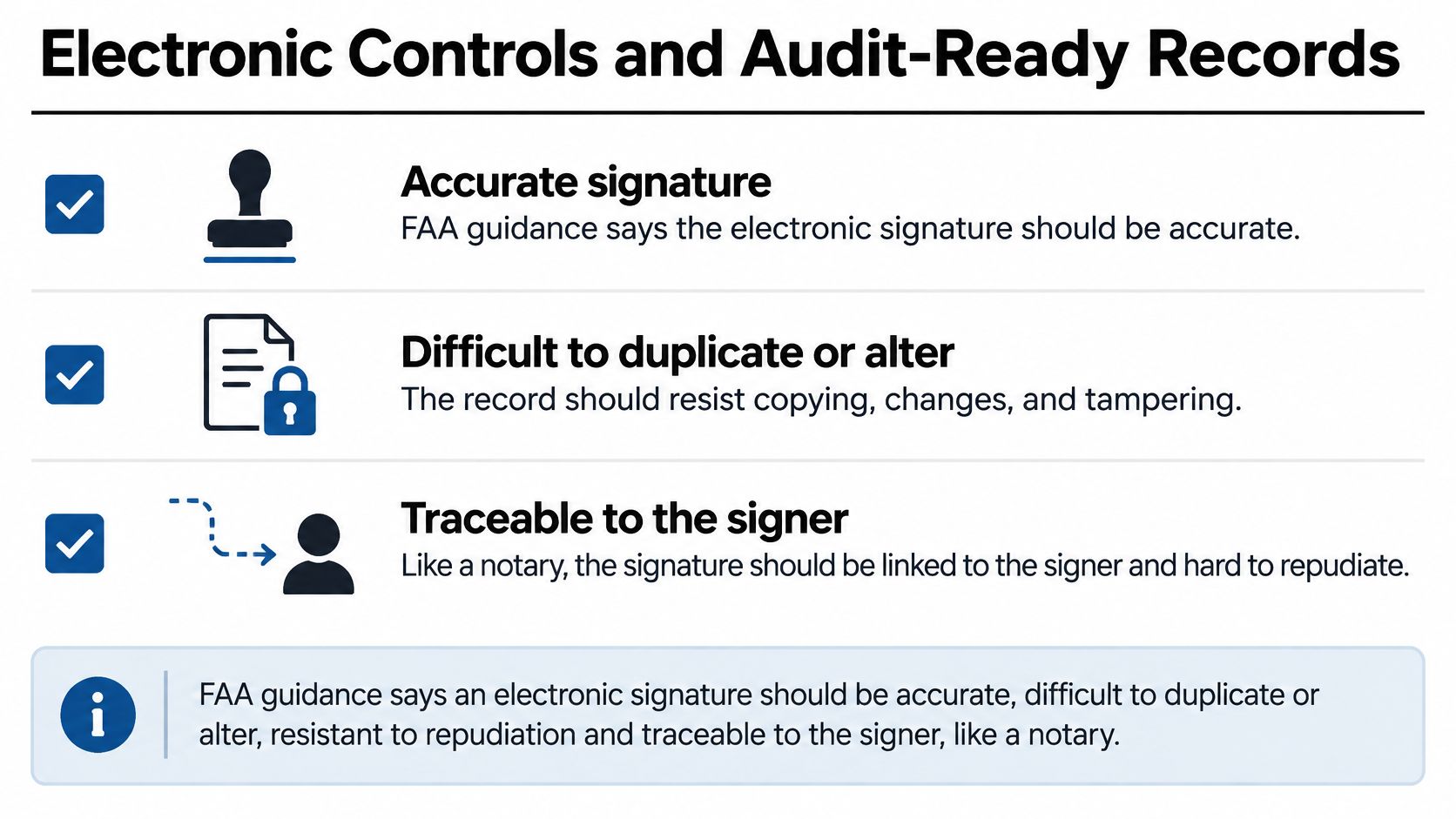
An entry is only as useful as your ability to show who signed it, when they signed it, and whether it changed afterward. FAA guidance says an electronic signature should be accurate, difficult to duplicate or alter, resistant to signer repudiation, and capable of positive traceability to the individual who signed the record, as explained in FAA guidance on electronic signatures and recordkeeping. A dated endorsement illustrates why each part matters: the record should identify the instructor and preserve the date and the signed content, even if someone later corrects an error.
Controls that make an entry defensible
- Unique user accounts: Each person signs in under their own identity, linking actions to the person who took them.
- Multi-factor authentication for instructors: A password alone offers limited protection for signing authority.
- Role-based permissions: Students can draft entries, while instructors sign finalized records. Neither role should be able to rewrite certified fields without leaving a trace.
- Signed event hash: A cryptographic fingerprint is attached to protected data. If that data changes, the signature no longer matches, making the alteration detectable.
- Append-only corrections: A correction creates a new, linked transaction. The original remains visible rather than being overwritten.
- Audit trail: The system records who made each change, when it happened, whose identity signed the entry, and how the record was revised.
Suppose an endorsement has the wrong date. A defensible system preserves the original, records the correction under its actual timestamp, and links the two entries. A reviewer can then distinguish a documented correction from an unexplained edit.
Questions a reviewer may ask
What happens when an instructor's certificate expires? The historical signature should remain attached to the entry, with the signing identity and date preserved. Later expiration should not erase who certified the lesson at the time.
Does a corrected entry keep its history? It should. The original, the correction, and the reason should remain visible as a connected record.
Does the PDF show the full record? Check that endorsements, simulator details, aircraft identifiers, and instructor credentials appear. For logging simulator time, device details matter because they help establish what the session supports.
Can an employer tell an approved correction from a quiet edit? Only if the audit trail is visible in the system or its export. Otherwise, even a legitimate correction may be difficult to substantiate.
Run an export test before each stage check and checkride. Confirm that totals, signatures, and corrections appear in the exported copy. An incomplete backup can leave gaps when you need to present your record.
Portability also matters. The Air Transport Association e-business program identifies inconsistent aviation data formats and rules as an ongoing industry problem. Keep three forms of the record: the live logbook, a readable PDF, and structured data with endorsements in an independent backup you control.
Your personal logbook is separate from the FAA Pilot Records Database. The FAA's Pilot Records Database final rule announcement explains that the database supports required sharing among covered operators. Ordinary flight-log details, such as departure point, destination, and flight time, are not reported to it. You remain responsible for keeping your own complete record.
A logbook that is easy to edit but hard to authenticate can create more career risk than a well-kept paper record.
How to Set Up Your Digital Logbook Step by Step
Set up your logbook before your first lesson so each flight starts with the same simple routine: record it, check it, and keep a copy.
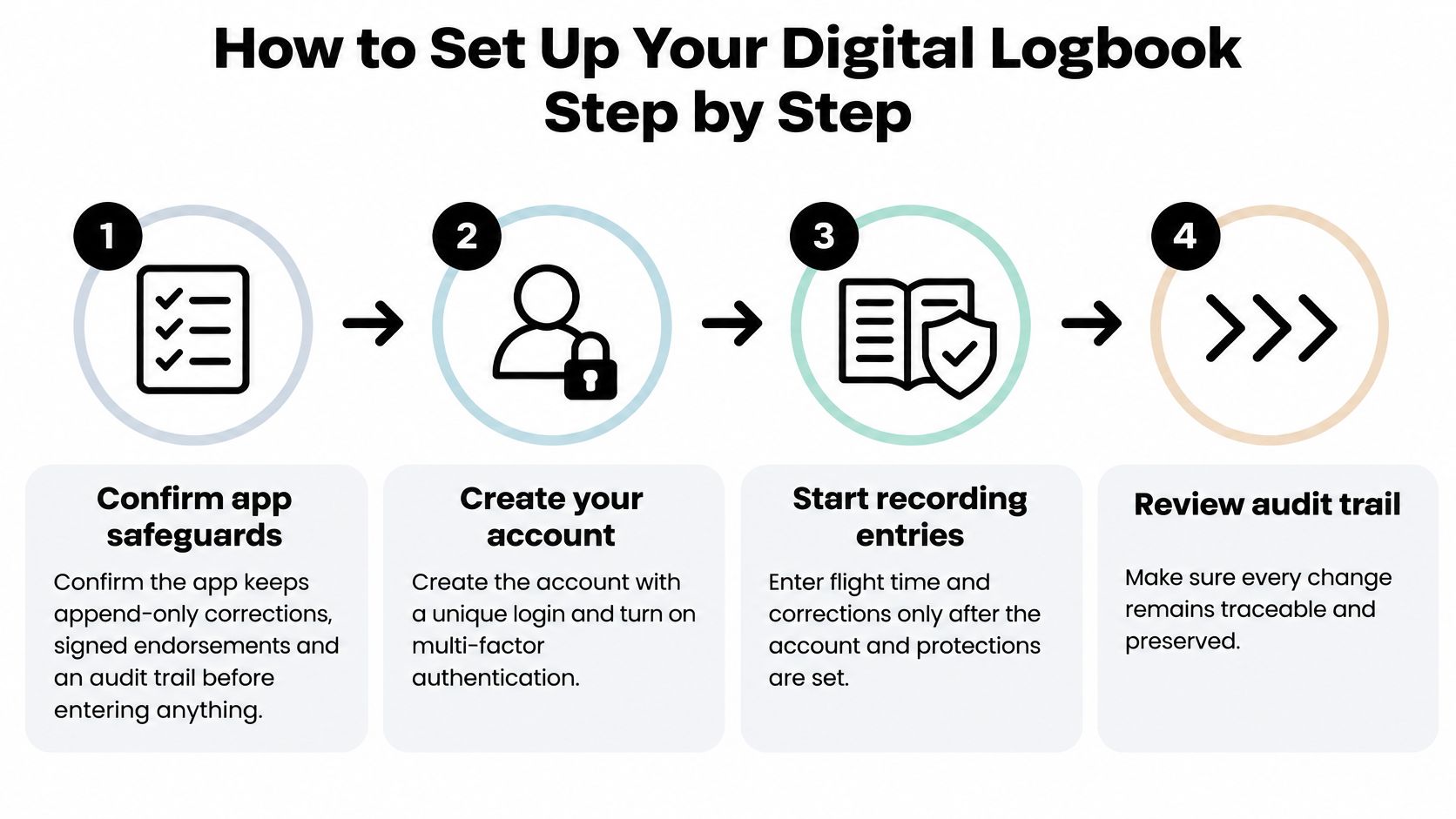
- Review the record controls: Before entering a flight, find the settings or help menu for corrections, endorsements, and audit history. Check that you can see who made a change and when.
- Secure your account: Choose a unique password and enable multi-factor authentication. Keep your login private so account activity remains tied to you.
- Create your first flight entry: Open a new entry and complete each applicable field while the lesson is fresh. Save it, then reopen it to confirm the information appears as intended.
- Set up aircraft and simulator profiles: Add each aircraft or device through the profile menu before logging time in it. Select the saved profile for later entries, and check that the identifier shown in the entry matches the one you intended.
- Request an endorsement: Open the relevant lesson or endorsement record and send the signing request through the logbook's workflow. Check the status afterward to confirm the signature is attached to the correct record.
- Check your export: Use the account's export menu to create a PDF and a structured data file. Open both files and confirm a sample entry and its totals are readable.
- Schedule backups: Add a monthly reminder to save a copy to storage you control. Repeat the process before a stage check or checkride, alongside the flight training requirements you are tracking.
A good setup makes the routine repeatable: enter the lesson, review the saved record, and keep a copy you can open independently.
Start Your Training Records on a Verified Path
Your first logbook entry can begin before you have any flying experience. Choose a starting point that fits your goal, then make sure you understand how each lesson will become a record you can use and substantiate later.
If you haven't flown yet
A discovery flight is a first flight with an instructor before you commit to training. You'll meet the instructor, preflight the airplane together, and take the controls in the air. No prior experience is needed.
Ask how the lesson will be recorded and how you can access the entry afterward. For many students, the first logbook question is not paper versus screen. It is whether the record will clearly connect the flight, its details, and the instructor's sign-off.
If you want the full career path
CFII's Career Track is a fixed-price route from zero experience to CFII and multi-engine qualifications. Its training portal includes a logbook alongside lessons, quizzes, and stage checks. Ask how the digital record fits into your instruction and how you can retain it if you later change logbook systems.
As you progress toward an FAA certified flight instructor, keep your own copy of the records that document your training. A useful logbook should remain understandable outside the app that created it: years later, a reviewer should be able to identify the flight, follow any corrections, and see which endorsements apply.
Start with records you can explain and preserve. CFII offers discovery flights for prospective students who want to meet an instructor and experience a lesson before committing.
Planning to fly for a living?
See what the path from zero to a pilot career looks like, what it costs and how long it takes.
Learn to fly in Riverside
We train at Riverside Municipal Airport in modern airplanes with a parachute built in. Start with a one hour discovery flight, no experience needed.